How to install Mongo Db server in windows server


First, download the mongo database MSI installer:

https://www.cloudtechtiq.com/storage/app/media/mongodb-win32-x86_64-2008plus-3.4.24-signed.msi

After download the msi installer, double click on it:

rrr1.png

Accept the user license agreement:

rrr2.png

Ready to install mongo ddb 3.4 with complete setup click on install now:

rrr3.png

To access mongo via GUI you can install the MongoDB Compass Community on server.

You can create the custom configuration file while using the following methods:

  1. Create the data and log Directories via cmd method.

     mkdir c:\data\db
     mkdir c:\data\log
  2. Create the configuration file for example :

C:\Program Files\MongoDB\Server\3.4\mongod.cfg

In the file specified the data path and custom port

#Where to write logging data.

systemLog:
destination: file
path: c:\data\log

#where to write  data.
storage:
dbPath: c:\data\db

#network interfaces
net:
port: 35615
bindIp: 127.0.0.1,103.x.x.x

#processManagement:

security:
authorization: "enabled"
  1. Create the MongoDB Service as per following command on CMD:

    sc.exe create MongoDB binPath= "\"C:\Program Files\MongoDB\Server\3.4\bin\mongod.exe\" --service --config=\"C:\Program Files\MongoDB\Server\3.4\mongod.cfg\"" DisplayName= "MongoDB" start= "auto"
  2. Start the mongo service :

Reset lost admin password on FortiGate unit (Password Recovery)

Periodically a situation arises where the FortiGate needs to be accessed or the admin account’s password needs to be changed but no one with the existing password is available. If a physical access to the device is possible and with a few other tools, the password can be reset.

By this article method we can reset password of the following FortiGate device –

  1. FortiGate

  2. FortiGate v5.0

  3. FortiGate v5.2

  4. FortiGate v5.4

  5. FortiWiFi v5.0

  6. FortiWiFi v5.2

  7. FortiWiFi v5.4

What is needed:

  1. Console cable

  2. Terminal software such as Putty.exe (Windows) or Terminal (MacOS)

  3. Serial number of the FortiGate device

Procedure:

Step 1.

Connect the computer to the firewall via the Console port on the back of the unit. In most units this is done either by a Serial cable or a RJ-45 to Serial cable. There are some units that use a USB cable and FortiExplorer to connect to the console port. Virtual instances will not have any physical port to connect to so you will have to use the supplied VM Hosts’ console connection utility.

Step 2.

Start your terminal software. (For example: putty)

Step 3.

Connect to the firewall using the following:

Setting Value Speed Baud 9600 Data Bits 8Bit Parity None Stop Bits 1 Flow Control No Hardware Flow Control Com Port The correct com-port

Step 4.

The firewall should then respond with its name or hostname. (If it does not try pressing "enter")

Step 5.

Reboot the firewall. If there is no power button, disconnect the power adapter and reconnect it after 10 seconds. Plugging in the power too soon after unplugging it can cause corruption in the memory in some units.

Step 6.

Wait for the Firewall name and login prompt to appear. The terminal window should display something similar to the following:

FortiGate-60C (18:52-06.18.2010)

Ver:04000010

Serial number: FGT60C3G10xxxxxx

CPU(00): 525MHz

Total RAM: 512 MB

NAND init... 128 MB

MAC Init... nplite#0

Press any key to display configuration menu...

......

reading boot image 1163092 bytes.

Initializing firewall...

System is started.

login:

Step 7.

Type in the username: maintainer

Step 8.

The password is bcpb plus the serial number of the firewall (the letters of the serial number are in UPPERCASE format)

For example: bcpbFGT60C3G10xxxxxx

On some devices, after the device boots, you have only 14 seconds or less to type in the username and password. It might, therefore, be necessary to have the credentials ready in a text editor, and then copy and paste them into the login screen.

There is no indicator of when your time runs out so it is possible that it might take more than one attempt to succeed.

Step 9.

Now you should be connected to the firewall. To change the admin password you type the following...

In a unit where vdoms are not enabled:

config system admin

edit admin

set password

end

In a unit where vdoms are enabled:

config global

config system admin

edit admin

set password

end

If you are concerned that there is a backdoor into the system then you can disable the maintainer account. The maintainer account is enabled by default, if you wish, there is an option to disable this feature. However, if you disable the feature and lose the password without having someone else that can log in as a superadmin profile user you will be out of options should the admin password be lost.

If you attempt to use the maintainer account and see the message on the console, “PASSWORD RECOVERY FUNCTIONALITY IS DISABLED”, this means that the maintainer account has been disabled.

Disabling the maintainer account.

Use the following command in the CLI to change the status of the maintainer account.

To disable

config system global

set admin-maintainer

disable

end

To enable

config system global

set admin-maintainer

enable

end

CloudTechtiq provides best services in India. we offer best and Sucre servers web hosting, tally on cloud, vps server, vps hosting, dedicated server, dedicated server hosting, office365, ssl certificate, aws server and etc.we provide best plans and services our team 24/7 available for tech support. 


Tally on cloud - Access from anywhere at anytime with seamless access

We provides fully Managed Tally on Cloud secure app access through RDP on windows cloud in India. You can host tally, busy and other CRM hrm application.

Managed Tally on cloud in India
Buy Cheap tally cloud hosting in India
Host your erp and accounting software easily on cloud server
WAH- Work at home with secure app access
Windows vps included with terminal license
Most Secure Tally on Cloud for Tally ERP9


Managed Tally on Cloud and Busy windows cloud hosting in India


Buy cheap and fully managed tally on cloud server in India @ 3000/- Monthly Order Now

Tally on cloud in India - Cloudtechtiq starts offering the new windows cloud servers as per the market research and demands in COVID situations. Now all the companies facing challenges in their regular work process from home with employees. We made a solution for the organization that wants to work from home with secured data and easy access called WAH.
Wah- is known as Work at home small applications that we can deploy on windows cloud servers in India. Wah, provide the following features.


Get started with Microsoft Office 365 for Free Education

Microsoft office for Students and educators at eligible institutions can sign up for Office 365 in India Education for free, including Word, Excel, PowerPoint, OneNote, and now Microsoft Teams, plus additional classroom tools. Use your valid school email address to get started today. Free Microsoft Office 365 for Students & Schools . 

Powerful tools for students and educators

Microsoft Office 365 works like you: everywhere. Familiar applications and always-accessible files update in real time to make building your curriculum seamless and easy on Android, iOS or Windows devices. It is very useful for students (Microsoft office for Students)

Microsoft Office for Student’s benefits.

1. Remote learning

Build collaborative classrooms, connect in professional learning communities, and connect with colleagues when you get Office 365 Student – which includes Microsoft Teams and is free for your entire school. Access all the training and support you need to create a safe, secure, and collaborative learning environment.

2. One place for organization

The ultimate digital notebook, OneNote helps you organize class materials and easily collaborate with students and colleagues.

3. Access anytime, anywhere, from any device

Bring conversations, content, and apps together all from a single Office 365 Education and student experience. Collaborate in real time without boundaries, and without worrying about lost formatting.

4. Simplify class management

Create classes and groups for Teams, Intune for Education, and more for free with School Data Sync.

5. This Tools to save time and money

An affordable suite of powerful tools built for educators and students, Office 365 is accessible from your favourite devices.

6. Equip your students for success today and tomorrow

When you use Office 365 Education in the classroom, your students learn a suite of skills and applications that employers value most. Whether it’s Outlook, Word, PowerPoint, Access or OneNote, prepare students for their futures today.

7. Cloud services to create a modern classroom

Create collaborative classrooms, connect in professional learning communities, and communicate with school staff with the power of OneDrive, Teams, Skype, and more -- all from a single experience in Office 365 Education

8. Get Office 365 Education for your entire school

Give every educator and student the power of Microsoft Office 365 Education on all their devices, including Word, Excel, PowerPoint, OneNote, Microsoft Teams, and free classroom tools.

9. Using Teams video meetings with office 365 students

During remote learning, video calls are a huge part of many teacher's communications with students. Use it for instruction, for student assessment, or even just to check in. Want to get up to speed and use Microsoft Teams Education video meetings like a pro? Here are more than 20 tips to get you navigating Teams in no time. Teams, channels, tabs and apps: How to use them Getting your Microsoft Teams Education classroom set up depends on one key aspect: Organization. Start a new channel for one of the reasons below -- or anything else! -- to keep your team organized and flowing smoothly with Office 365 Student Plan Ideas for using channels in your classroom
  • Private channels for small-group work
  • Channels into units or topics
  • Project or inquiry channels
  • Q&A or resources channels
  • Channels for collaborative study space for students (with a stream of tutorials)
  • Unit idea channels (Add in a new unit; hide/delete after unit is over)
  • Channels for differentiated content (Distribute different content to different groups by creating unique channels)

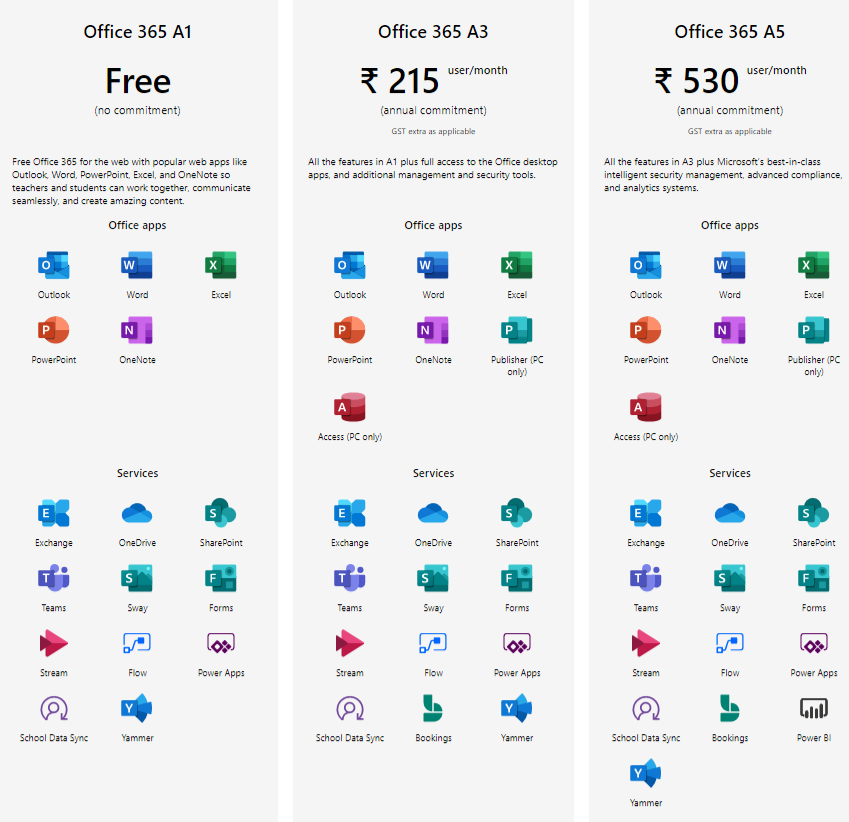
Microsoft Office 365 Plans in India for Educations


ABOUT CLOUDTECHTIQ

CloudTechtiq founded in 2017 since then it has emerged as a niche managed web hosting, Dedicated Server, and Cloud Server Company in Indi...